Showing posts with label Hardware solutions. Show all posts
Showing posts with label Hardware solutions. Show all posts
Sunday, December 26, 2010
secret back door gor many websites
Ever experienced this? You ask Google to look something up; the engine returns with a number of finds, but if you try to open the ones with the most promising content, you are confronted with a registration page instead, and the stuff you were looking for will not be revealed to you unless you agree to a credit card transaction first....
The lesson you should have learned here is: Obviously Google can go where you can't.
Can we solve this problem? Yes, we can. We merely have to convince the site we want to enter, that WE ARE GOOGLE.
In fact, many sites that force users to register or even pay in order to search and use their content, leave a backdoor open for the Googlebot, because a prominent presence in Google searches is known to generate sales leads, site hits and exposure.
Examples of such sites are Windows Magazine, .Net Magazine, Nature, and many, many newspapers around the globe.
How then, can you disguise yourself as a Googlebot? Quite simple: by changing your browser's User Agent. Copy the following code segment and paste it into a fresh notepad file. Save it as Useragent.reg and merge it into your registry.
Windows Registry Editor Version 5.00
[HKEY_LOCAL_MACHINE\SOFTWARE\Microsoft\Windows\CurrentVersion\Internet Settings\5.0\User Agent]
@="Googlebot/2.1"
"Compatible"="+http://www.googlebot.com/bot.html"
Voila! You're done!
You may always change it back again.... I know only one site that uses you User Agent to establish your eligability to use its services, and that's the Windows Update site...
To restore the IE6 User Agent, save the following code to NormalAgent.reg and merge with your registry:
Windows Registry Editor Version 5.00
[HKEY_LOCAL_MACHINE\SOFTWARE\Microsoft\Windows\CurrentVersion\Internet Settings\5.0\User Agent]
@="Mozilla/4.0 (compatible; MSIE 6.0; Windows NT 5.1)"
Ps:
Opera allows for on-the-fly switching of User Agents through its "Browser Identification" function, while for Mozilla/FireFox browsers a switching utility is available as an installable extension from this url:
help://chrispederick.myacen.com/work/firefox/useragentswitcher/download/


beep error codes

After repeated requests for beep codes i have decided to post them here maybe they could be pinned
Standard Original IBM POST Error Codes
Code Description
1 short beep System is OK
2 short beeps POST Error - error code shown on screen No beep Power supply or system board problem Continuous beep Power supply, system board, or keyboard problem Repeating short beeps Power supply or system board problem
1 long, 1 short beep System board problem
1 long, 2 short beeps Display adapter problem (MDA, CGA)
1 long, 3 short beeps Display adapter problem (EGA)
3 long beeps 3270 keyboard card
Friday, July 9, 2010
shout cuts for the Symbols used in MS Word, Excel,etc
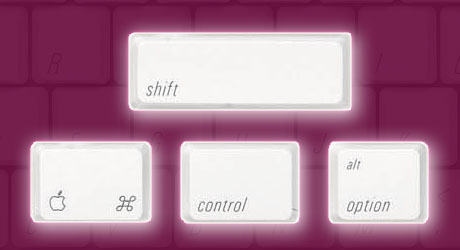
For © : Alt+0169
For ® : Alt+0174
For ™ : Alt+0153
For › : Alt+0155
For † : Alt+0134
For ø : Alt+0248
For ¤ : Alt+0164
For « : Alt+0171
For ° : Alt+0176
For ± : Alt+0177
DELETE AN UNDELETABLE FILE

Delete An "undeletable" File
Open a Command Prompt window and leave it open.
Close all open programs.
Click Start, Run and enter TASKMGR.EXE
Go to the Processes tab and End Process on Explorer.exe.
Leave Task Manager open.
Go back to the Command Prompt window and change to the directory the AVI (or other undeletable file) is located in.
At the command prompt typeDEL
Go back to Task Manager, click File, New Task and enter EXPLORER.EXE to restart the GUI shell.
Open a Command Prompt window and leave it open.
Close all open programs.
Click Start, Run and enter TASKMGR.EXE
Go to the Processes tab and End Process on Explorer.exe.
Leave Task Manager open.
Go back to the Command Prompt window and change to the directory the AVI (or other undeletable file) is located in.
At the command prompt type
Go back to Task Manager, click File, New Task and enter EXPLORER.EXE to restart the GUI shell.
The Medicine when Folder option vanishes.....

Method
1: Here's how you can get Folder Options back..
1: Open Start menu and from there select Run
2: type gpedit.msc and hit enter
3: now in the Group Policy window, from the left pane, select user configuration->Administrative Tempelates->windows components->Windows Explorer by highlighting it with the mouse cursor..
4: now in the right side you will see an option which says "Removes the Folder Options menu item from the Tools menu"
5: right click on this option and select properties
6: now in the properties under Setting tab, select Disabled and hit OK
1: Here's how you can get Folder Options back..
1: Open Start menu and from there select Run
2: type gpedit.msc and hit enter
3: now in the Group Policy window, from the left pane, select user configuration->Administrative Tempelates->windows components->Windows Explorer by highlighting it with the mouse cursor..
4: now in the right side you will see an option which says "Removes the Folder Options menu item from the Tools menu"
5: right click on this option and select properties
6: now in the properties under Setting tab, select Disabled and hit OK
Add a photo to my computer properties..
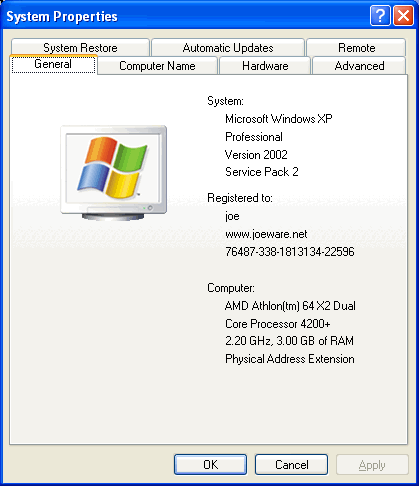
To do this:
1. Open Notepad.
2. Type the following:[General]Manufacturer="your_nameModel=HP d530 SFF(DC578AV)[Support Information]Line1= Your Ph NoLine2= Your Address.....
3. Save as "oeminfo.ini" in the System32 folder.(Without Quote)
4. Create a bmp file(Your Photo) and save it the System32 folder as "oemlogo.bmp"(Without Quote).
5. Now Check your My Computer Properties.
1. Open Notepad.
2. Type the following:[General]Manufacturer="your_nameModel=HP d530 SFF(DC578AV)[Support Information]Line1= Your Ph NoLine2= Your Address.....
3. Save as "oeminfo.ini" in the System32 folder.(Without Quote)
4. Create a bmp file(Your Photo) and save it the System32 folder as "oemlogo.bmp"(Without Quote).
5. Now Check your My Computer Properties.
DISABLE THE SEND ERROR REPORT TO MICROSOFT FEATURE

GETTING FED UP WITH A MESSAGE DISPLAYING (send error report
to microsoft)
solution to this problem is
To disable the stupid feature in WinXP which tries to send a report to microsoft every time a program crashes you will have to do this:
solution to this problem is
To disable the stupid feature in WinXP which tries to send a report to microsoft every time a program crashes you will have to do this:
Creating 3D Window Effect

You can create a nice 3D effect for your windows
Start Regedit
Go to HKEY_CURRENT_USER \ Control Panel \ Colors
Make sure the following setting are there:
ButtonHilight=128 128 128ButtonShadow=255 255 255
Start Regedit
Go to HKEY_CURRENT_USER \ Control Panel \ Colors
Make sure the following setting are there:
ButtonHilight=128 128 128ButtonShadow=255 255 255
LOCK UR DESKTOP ICONS

To lock your desktop icons into place
first arrange it carefully the way you want
it to be
then open up the registry editor.
Go to HKEY_CURRENT_USER\Software\Microsoft\Windows\
CurrentVersion\Policies\Explorer.
Right-click in the right pane and select
New, DWORD Value name NoSaveSettings
and press the Enter key.
Right-click on the new NoSaveSettings item
and select Modify.
Enter 1 in the Value data box.
After this, whenever you restart Windows,
your settings will return to their current state.
23 ways to speed up your pc

1.) To decrease a system's boot time and increase system performance, use the money you save by not buying defragmentation software -- the built-in Windows defragmenter works just fine -- and instead equip the computer with an Ultra-133 or Serial ATA hard drive with 8-MB cache buffer.
2.) If a PC has less than 512 MB of RAM, add more memory. This is a relatively inexpensive and easy upgrade that can dramatically improve system performance.
3.) Ensure that Windows XP is utilizing the NTFS file system. If you're not sure, here's how to check: First, double-click the My Computer icon, right-click on the C: Drive, then select Properties. Next, examine the File System type; if it says FAT32, then back-up any important data. Next, click Start, click Run, type CMD, and then click OK. At the prompt, type CONVERT C: /FS:NTFS and press the Enter key. This process may take a while; it's important that the computer be uninterrupted and virus-free. The file system used by the bootable drive will be either FAT32 or NTFS. I highly recommend NTFS for its superior security, reliability, and efficiency with larger disk drives.
4.) Disable file indexing. The indexing service extracts information from documents and other files on the hard drive and creates a "searchable keyword index." As you can imagine, this process can be quite taxing on any system.
The idea is that the user can search for a word, phrase, or property inside a document, should they have hundreds or thousands of documents and not know the file name of the document they want. Windows XP's built-in search functionality can still perform these kinds of searches without the Indexing service. It just takes longer. The OS has to open each file at the time of the request to help find what the user is looking for.
Most people never need this feature of search. Those who do are typically in a large corporate environment where thousands of documents are located on at least one server. But if you're a typical system builder, most of your clients are small and medium businesses. And if your clients have no need for this search feature, I recommend disabling it.
Here's how: First, double-click the My Computer icon. Next, right-click on the C: Drive, then select Properties. Uncheck "Allow Indexing Service to index this disk for fast file searching." Next, apply changes to "C: subfolders and files," and click OK. If a warning or error message appears (such as "Access is denied"), click the Ignore All button.
5.) Update the PC's video and motherboard chipset drivers. Also, update and configure the BIOS. For more information on how to configure your BIOS properly, see this article on my site.
Wednesday, July 7, 2010
TRICK TO ADD UR FAVOURITE WEBSITE IN START MENU

Right click on the Start button and select Explore
After Windows Explorer opens, in the right window pane, right click and select New / Shortcut
In the "Type the location of the item" enter the Web Site URL you want to create. FOR EXAMPLE http://navidosth.blogspot.com/
Click Next
In the "Type a name for this shortcut:" enter a name for the link that you want to display in the Start menu. eg : PC TRICKS
Click Finish
Now click on the Start menu and you will see the new link you just created. Click on it and it will open THAT website
Monday, July 5, 2010
Interview Questions ! Flash Games ! Latest Jobs

I came across a site that is a hub of un-limited interview questions on asp.net, testing, php, java, oracle etc.This site also includes Freelance projects, Online air ticket reservation functionality, gaming, latest sports news, discussion forum, directory submission, latest jobs.
Here is the link to that site:

Saturday, July 3, 2010
How To Get The Most From Your Ipod
 Since the iPod was first introduce over fours ago is has proven to be a versatile little tool. Even though the architecture is tightly closed, hackers have managed to find their way in so that they can make modifications. Software developers and creators of content have made it possible for you to use the iPod to keep all kinds of information at your finger tips. Besides being a unique way to carry around your music wherever you go, the iPod can be used for many other purposes.
Most people buy an iPod for the obvious reasons. The iPod works with your computer so that you can import music and organize your songs and photos. These files are then transferred to your iPod so that you can listen to them and view them wherever you go.
How make faster windows7 (windows 7 registry tweak)
How make faster windows7 (windows 7 registry tweak)

1. Simply start the first step to open the Notepad.
2. Copy and paste the following script into the notepad.
3. Save as the file name in . reg extension , for example: free7.reg
4. Then double click the free7.reg file . And when the confirmation box appears "Are you sure you want add the information in......to the registry?" select "Yes"
Then restart your computer, you are guaranteed that your windows7 OS will be faster
Friday, July 2, 2010
Recover the lost administrators password

Slightly more work needed if
you lose or forget the Windows XP administrator password.
1.First reboot Windows XP in safe mode by re-starting the computer and pressing F8 repeated as the computer starts up.
2.Then (in safe mode) click Start and then click Run. In the open box type "control userpasswords2" without the quotes - I have just used quotes to differentiate what you have to type.
3.You will now have access to all the user accounts, including the administrators account and will be able to reset the lost password.
4.Just click the administrators user account, and then click Reset Password.
5.You will need to add a new password in the New password and the Confirm new password boxes, and confirm by clicking OK.
All done, you have recovered the lost admistrator's password!
1.First reboot Windows XP in safe mode by re-starting the computer and pressing F8 repeated as the computer starts up.
2.Then (in safe mode) click Start and then click Run. In the open box type "control userpasswords2" without the quotes - I have just used quotes to differentiate what you have to type.
3.You will now have access to all the user accounts, including the administrators account and will be able to reset the lost password.
4.Just click the administrators user account, and then click Reset Password.
5.You will need to add a new password in the New password and the Confirm new password boxes, and confirm by clicking OK.
All done, you have recovered the lost admistrator's password!
Creating 3D Window Effect

Start Regedit
Go to HKEY_CURRENT_USER \ Control Panel \ Colors
Make sure the following setting are there:
ButtonHilight=128 128 128ButtonShadow=255 255 255
INCREASE UR SYSTEM PERFORMANCE

If you have 512 megs or more of memory,
u can increase system performance
by having the core system kept in memory
steps are
Start Regedit
Go to HKEY_LOCAL_MACHINE\SYSTEM\CurrentControlSet\Control\Session
Manager\Memory Management\DisablePagingExecutive
Set the value to be 1
Reboot the computer
maintain your computer

You may not realize it, but your computer and your car have something in common: they both need regular maintenance. No, you don't need to change your computer's oil. But you should be updating your software, keeping your antivirus subscription up to date, and checking for spyware. Read on to learn what you can do to help improve your computer's security.
Getting started
Here are some basics maintenance tasks you can do today to start improving your computer's security. Be sure you make these part of your ongoing maintenance as well.
* Sign up for software update e-mail notices. Many software companies will send you e-mail whenever a software update is available. This is particularly important for your operating system (e.g., Microsoft VV!|VD0VV$® or Macintosh), your antivirus program, and your firewall.
* Register your software. If you still have registration forms for existing software, send them in. And be sure to register new software in the future. This is another way for the software manufacturer to alert you when new updates are available.
* Install software updates immediately.
When you get an update notice, download
the update immediately and install it. (Remember, downloading and installing are two separate tasks.)
the update immediately and install it. (Remember, downloading and installing are two separate tasks.)
An ounce of prevention
A few simple steps will help you keep your files safe and clean.
* Step 1: Update your software
* Step 2: Backup your files
* Step 3: Use antivirus software and keep it updated
* Step 4: Change your passwords
Developing ongoing maintenance practices
Now that you've done some ground work, it's time to start moving into longer term maintenance tasks. These are all tasks that you should do today (or as soon as possible) to get started. But for best results, make these a part of a regular maintenance schedule. We recommend setting aside time each week to help keep your computer secure.
* Back up your files. Backing up your files simply means creating a copy of your computer files that you can use in the event the originals are lost. (Accidents can happen.) To learn more read our tips for backing up information.
* Scan your files with up to date antivirus software. Use your antivirus scan tool regularly to search for potential computer viruses and worms. Also, check your antivirus program's user manual to see if you can schedule an automatic scan of your computer. To learn more, read our tips for reducing your virus risk
.
* Change your passwords. Using the same password increases the odds that someone else will discover it. Change all of your passwords regularly (we recommend monthly) to reduce your risk. Also, choose your passwords carefully. To learn more, read our tips for creating stronger passwords
.
Making a schedule
One of the best ways to help protect your computer is to perform maintenance regularly. To help you keep track, we suggest making a regular "appointment" with your computer. Treat it like you would any other appointment. Record it in your datebook or online calendar, and if you cannot make it, reschedule. Remember, you are not only helping to improve your computer, you are also helping to protect your personal information.
Wednesday, June 30, 2010
hide your folders

first create a new folder somewhere on your hard drive
when you name it hold down "Alt" and press "0160" this will create and invisible space so it will apper as if it has no name.
then right click in and select "Properties" select the tab "coustimize" and select "change icon" scroll along and you should a few blanc spaces click on any one and click ok when you hav saved the settings the folder will be invisible to hide all your personal files
Subscribe to:
Posts (Atom)